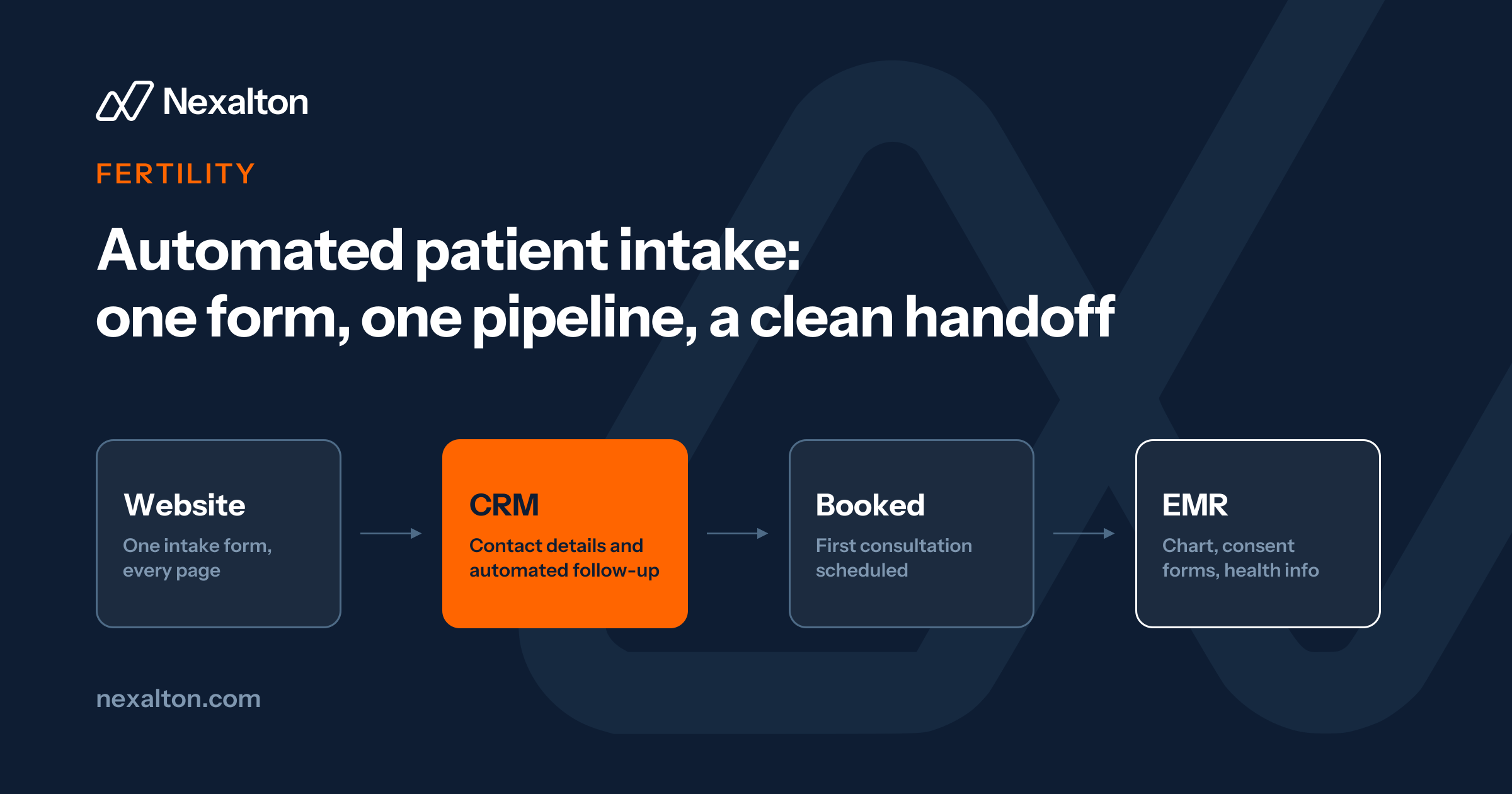
Replacing scattered web forms with one intake form puts every inquiry in one place, so none get lost.
Keep prospects in a HIPAA-enabled CRM and patients in the EMR, with a clear handoff at the booked appointment.
Automate follow-up through the steps where inquiries stall: referrals, insurance details, and consent forms.
A patient who fills out a form on a fertility clinic's website has usually been thinking about it for months. If nobody replies for two days, they book with the clinic that did reply.
Most clinics don't lose these inquiries because their staff don't care. They lose them because the intake process was never designed. It grew one form, one inbox, and one spreadsheet at a time. Automated patient intake fixes that by capturing every inquiry in one place and following up on time.
Here is what that looked like at a fertility clinic we work with, what we changed, and where we'd tell any clinic owner to start.
What patient intake looks like before it's fixed
32different contact formson the clinic's website when we started. Nobody had planned it that way.
Over the years, different people had added forms to different pages as the need came up. Each form sent an email notification to whoever set it up. That person then copied the details into a spreadsheet so the team could follow up. The problems followed from there:
Follow-up was slow or didn't happen. Every inquiry depended on one person noticing an email and retyping it.
Staff changes broke the process. When someone left, their notifications kept going to an inbox nobody checked. New staff didn't know half the forms existed.
Nobody could see the whole picture. With inquiries spread across emails and a spreadsheet, the clinic couldn't say how many leads it had, where they came from, or how many became patients.
None of this is unusual. If your clinic's website has been edited by several people over several years, it's worth counting your forms. You may find the same thing.
Step 1: one form, one system
We removed all 32 forms and replaced them with one intake form, built in the clinic's CRM and embedded wherever it's needed on the site. We also gave each visitor a clear path based on what they want:
General questions go to the contact page.
People ready to talk to a doctor go to the consultation page.
Every submission lands in the same place, whatever page it came from. No email forwarding, no copying into a spreadsheet, and no form that only one person knows about.
Step 2: keep lead management separate from the EMR
This is a decision many clinics get wrong, in one direction or the other. Some try to run everything in the EMR (electronic medical record, which many US clinics call an EHR). It was built for patient care, not for following up with people who haven't booked yet. Others keep prospects in spreadsheets because the EMR doesn't fit.
We kept two separate systems with a clear handoff:
1
The CRM handles prospects. It's HIPAA-enabled, with a signed business associate agreement (BAA). Every new inquiry, from ads, search, or the website, goes into one pipeline there.
2
The EMR handles patients. The clinic's existing EMR wasn't touched.
3
The handoff happens at the booked appointment. Once a prospect books with a doctor, their details move into the EMR. Before that, they live in the CRM.
This keeps the EMR clean, keeps clinical staff out of sales follow-up, and gives the front desk the right tool for the job.
Ready to fix what's slowing you down?A free 30-minute call to find where things stall today.
Step 3: automate follow-up until the first appointment
At this clinic, new patients need a referral before their first appointment. That's where inquiries used to stall.
In the US
It depends on the patient's insurance. HMO plans usually require a referral from a primary care doctor before a specialist visit. Many PPO patients can book a fertility specialist directly.
Either way, many clinics have a step where the patient has to go get something, whether that's a referral, an authorization, or insurance details, and that's where inquiries go cold. Now, when an inquiry arrives:
The right team member is notified right away in the CRM, not in someone's personal inbox.
They contact the patient and explain what's needed before the first appointment, such as a referral if the patient's plan requires one.
The system reminds the team to follow up over the next few days until the paperwork is in and the appointment is booked.
Calls, texts, and emails all happen from the same system, so anyone on the team can pick up where a colleague left off.
Step 4: prepare the patient for the first visit
Following up gets the appointment booked. Before the first consultation, the patient still has paperwork to complete. At this clinic, it works like this:
On the first call, the team collects contact and coverage details for the patient and their partner, and tells them to expect consent forms. Fertility care often involves two people, so intake has to capture both.
Once the appointment is booked, the patient's chart is created in the EMR, and the consent forms are sent from the EMR to be signed digitally before the first consultation.
Health information stays in the EMR. The CRM holds contact details and the follow-up history. Nothing clinical goes into it.
In the US, this stage usually also includes insurance verification: confirming the patient's plan and what it covers before the first visit (NYU Langone). If your front desk still checks coverage by phone, many practice management and EMR systems can do it electronically instead, using the standard eligibility inquiry adopted under HIPAA, known as the X12 270/271 transaction (CMS). Once inquiry follow-up is running smoothly, this is usually the next manual step worth automating.
Keeping patient intake HIPAA-safe
Intake forms collect protected health information, so the tools behind them need to be set up for it. The basics we follow:
HIPAA basics
A signed BAA with every vendor that stores or handles patient information, including your CRM and form tool. HIPAA requires one for these "business associates" (HHS).
HIPAA mode switched on in the CRM, not just a plan that supports it.
Health information in the EMR, not the CRM. The CRM needs contact details and follow-up history, not medical history. Keeping clinical details out of it means far less sensitive data sits in your follow-up system.
Only the information you need at intake. HIPAA's minimum necessary standard applies here (HHS). A first inquiry rarely needs a full medical history.
Access limited by role, so each person sees what their job requires.
This is a practical checklist, not legal advice. Confirm the details with your compliance lead.
What changes after automating patient intake
No more spreadsheets. Nobody at the clinic retypes an inquiry anymore.
Faster, more consistent follow-up. Inquiries reach the right person as they arrive, and reminders keep them from going cold.
Staff changes don't lose leads. The process lives in the system, not in one person's inbox.
The clinic knows what's working. For every inquiry, the team can see where it came from (organic search, paid search, paid social, or elsewhere), which pages the person visited, and which page turned them into a lead. That shows which channels actually produce patients, so time and budget go there.
Rakesh Reddy is the Managing Director of Nexalton, a technology and systems firm. He leads work across digital transformation strategy, systems setup and CRM integration, web and ecommerce platforms, custom AI agents, sales enablement, and business automation, helping established businesses connect their systems and automate the work that slows them down.
It's a process where new patient inquiries are captured, routed to the right person, and followed up by a system instead of by hand. For a fertility clinic, that usually means one intake form, a CRM pipeline, automatic notifications and reminders, and a defined handoff into the EMR.
Should patient intake run in our EMR or a separate CRM?
For most clinics, a separate HIPAA-enabled CRM works better for prospects. The EMR is built for patient care. A CRM is built for follow-up. Move people into the EMR once they book an appointment.
Is a CRM HIPAA compliant for patient intake?
It can be, if the vendor offers a HIPAA-enabled setup, signs a BAA with your clinic, and you configure it correctly. Check both before any patient information goes in.
What happens between booking and the first fertility consultation?
Usually the patient's chart is created in the EMR, consent forms are sent for digital signature, and in the US, the patient's insurance coverage is verified. Keeping these steps in the EMR keeps health information out of the CRM.
How many intake forms should a clinic website have?
Ideally one, reused across the site. Different pages can lead to different steps, like a contact page and a consultation page, but submissions should all land in the same system.
Let's Find What's Slowing You Down
Thirty minutes, no obligation. Fix the gaps, improve operations, and build systems that help your business move faster.